
Student Alarmclock Lite1.3 - Google Play
You'll be able to see results in few seconds.
Publisher Description
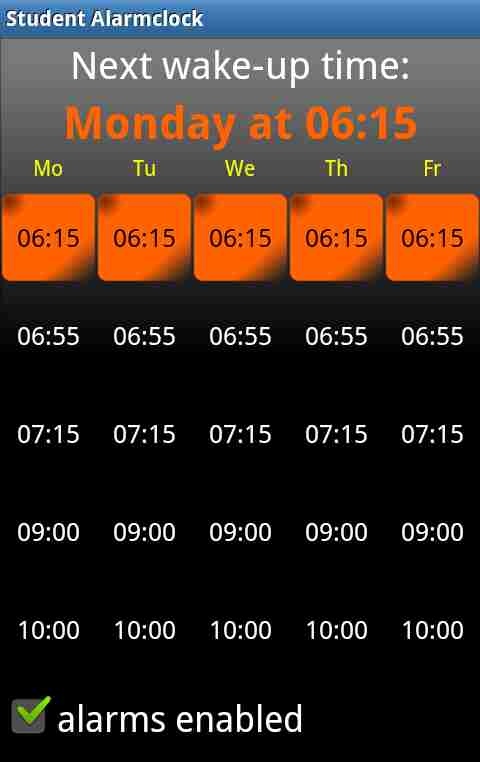
Student Alarmclock makes every day life easy: Once the wake-up times set you will be waked at the correct time. If your time table changes or lessons are cancelled, it will be easy to adapt the settings to that.
If you like Student Alarmclock I would appreciate if you bought the pro version of this app to support the development of this app and to be able to use more features.
FEATURES
- setting the wake-up times
- changing wake-up times temporarily (e.g. if a lesson is cancelled)
- automatical resetting changes back to the schedule, to be punctual in the following week
- sound volume adjustable (with preview)
- alarm tone choosable (file from SD-Card, [PRO] web radio, ring tones)
- snoozing with adjustable frequency and intervals
- waking at weekends also supported
- disabling specific days you do not want to be waked at (for LITE only weekend)
- tutorial
- auto muting during school
- free of ads
- backup all your settings and wake-up times...
- [PRO] ... and restore them
- [PRO] flip-to-snooze (flip your device to put the alarm clock into snooze mode)
- [PRO] task to solve if stopping the alarm clock to prove you are awake
- [PRO] homescreen widget
PERMISSIONS
■ modify/delete USB storage contents: Required to backup data to USB storage
■ read sensitive log data: Required for debugging. No log data will be send automatically. Only you can read this log data from the Help/Feedback menu and send it to me via e-mail, if something is not working. The log data will only be used to solve the problem and will be deleted afterwards.
■ disable key lock, prevent phone from sleeping: Is required to temporarily disable these locks to show the wake screen. Afterwards the key lock is enabled again.
■ modify system settings: Required to enable flight mode for auto muting
-----------------------------------------------------------------------
I always try to fix bugs as soon as possible and I tested the app on several devices but I can not ensure that the app works on every device. I assume no liability for any damages caused by bugs. If you have any problems or bugs you can use the Help/Feedback option inside the app, send me an e-mail or contact me via facebook(https://www.facebook.com/pages/Sch%C3%BClerwecker/480943465301922).
[Please note] As of October 2014 unfortunately the pro version will not be available for an indeterminate period of time. This fact is due to a change in the Google Developer Distribution Agreement.
About Student Alarmclock Lite
The company that develops Student Alarmclock Lite is Marco Schuster. The latest version released by its developer is 1.3.
To install Student Alarmclock Lite on your Android device, just click the green Continue To App button above to start the installation process. The app is listed on our website since 2015-03-24 and was downloaded 0 times. We have already checked if the download link is safe, however for your own protection we recommend that you scan the downloaded app with your antivirus. Your antivirus may detect the Student Alarmclock Lite as malware as malware if the download link to de.MarcoSchuster.SchuelerWeckerLite is broken.
How to install Student Alarmclock Lite on your Android device:
- Click on the Continue To App button on our website. This will redirect you to Google Play.
- Once the Student Alarmclock Lite is shown in the Google Play listing of your Android device, you can start its download and installation. Tap on the Install button located below the search bar and to the right of the app icon.
- A pop-up window with the permissions required by Student Alarmclock Lite will be shown. Click on Accept to continue the process.
- Student Alarmclock Lite will be downloaded onto your device, displaying a progress. Once the download completes, the installation will start and you'll get a notification after the installation is finished.
Program Details
System requirements
Download information
Pricing
Version History
version 1.3
posted on 2015-03-24
1.3,- Fixed a bug causing the alarm to be unreliable on some devices,1.2,- Fixed a bug in auto muting,1.1,- Auto muting during school added,- Days you do not want to be waked at can be disabled individually (for LITE only weekend),- Tutorial added,- Monochrome notification icon,- Several bugfixes
Disclaimer
Official Google Play Link
We do not host Student Alarmclock Lite on our servers. We did not scan it for viruses, adware, spyware or other type of malware. This app is hosted by Google and passed their terms and conditions to be listed there. We recommend caution when installing it.
The Google Play link for Student Alarmclock Lite is provided to you by apps112.com without any warranties, representations or guarantees of any kind, so access it at your own risk.
If you have questions regarding this particular app contact the publisher directly. For questions about the functionalities of apps112.com contact us.
